Evaln AI:
Exceptional Evaluations in a Fraction of the Time

Capture lessons, align evidence, and deliver actionable feedback in minutes. Join the forward-thinking districts reclaiming hundreds of hours every year.
The Problem

Observation paperwork is quietly stealing weeks from your year.

Observation cycles should improve teaching — not consume administrator time.

Time Drain

Observations take hours of paperwork instead of minutes of coaching.

Slow Feedback

Teachers wait days or weeks for feedback that should be immediate.

Inconsistent Evaluations

Rubrics vary widely across evaluators and schools.

Admin Overload

Documentation pulls leaders away from classrooms.

How Our System Works

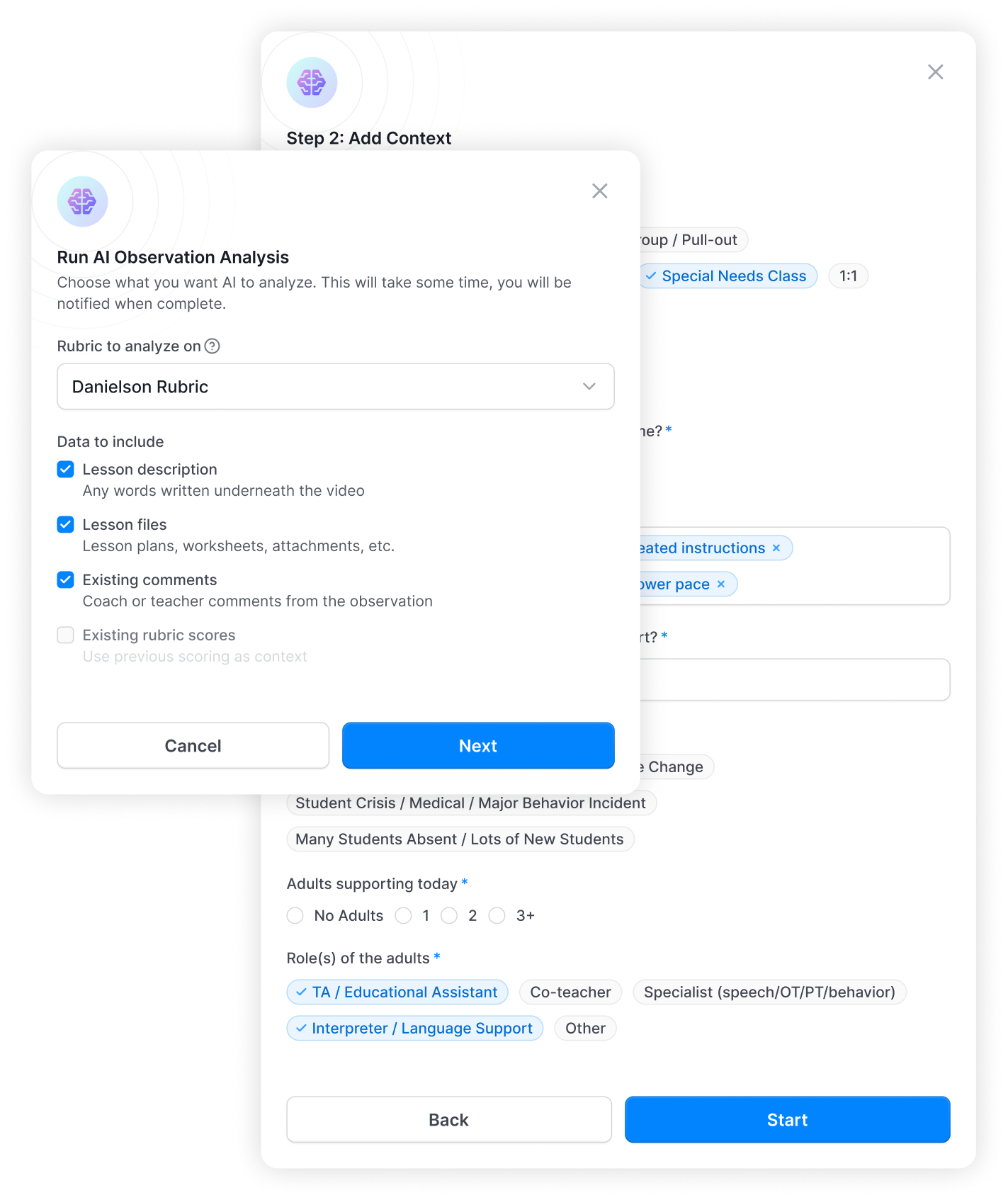
Just a few clicks, and you’ll watch the magic run. Evaln captures the lesson, aligns evidence to your rubric, and drafts a ready-to-send report in minutes.
iPhone mockup

Capture

Simple camera setup captures classroom instruction with optimized audio and video quality.

Process

AI analyzes lesson context, student engagement, and teaching strategies using approved frameworks.

Evaluate

Generates comprehensive Danielson rubric scores with detailed evidence and timestamps.

Feedback

Delivers clear, actionable coaching with specific examples and improvement suggestions.

What if your next observation
wrapped up by 10 a.m.?

Evaln does the documentation: live transcription, evidence tagging, rubric alignment — while you focus on what you actually see in the room. You review a complete, cite-ready report in minutes, not hours. Your judgment stays front and center. So does your afternoon.
375
hours saved per admin, per year, on average

23 hrs

Administrators spend up to 3 hours per observation: transcribing notes, writing narratives, aligning evidence to rubric components, formatting reports — all manually.

<15 minutes

AI handles transcription, evidence alignment, and report generation. Admins review, refine, and deliver — keeping full professional judgment with a fraction of the effort.

As Seen In & Presented At

"Those who make the biggest impact in a child's life are those working directly in the classroom. Evaluations shouldn't be a compliance checklist — they need to become real coaching conversations."
Jeff Horton
Superintendent
Southwest Metro ID 288
Featured At
FETC
Future of Education Technology Conference
COSSBA
Cooperative of Small School Districts

0% Time Waste. 100% Efficiency.

Administrators didn't just save time — they found the Evaln output accurate enough to trust on the spot. Here's what the data showed.

Admin Agreement Rate

1.75%

When comparing Evaln AI scores to human evaluator ratings across all observations, the average difference was just 1.75% — meaning administrators and AI are scoring nearly identically, observation after observation.
2.61
Human
2.54
AI

Boost Your Accuracy

+25%

In 1 out of every 4 evaluations where there was a difference between the administrator's initial assessment and Evaln AI's evaluation, administrators chose to align their final evaluation with the AI's recommendation.
18 / 70
Changed
52 / 70
Unchanged

Consistency Benchmark

73%

Evaln AI scores fall within the same 70–80% range as trained human evaluators — hitting 73% consistency and demonstrating the kind of reliable, repeatable scoring that districts can trust at scale.
70%
73%
75%
77%
80%

Not Just Faster. Smarter.

AI-generated feedback doesn’t just save time — it delivers clearer, evidence-based insights teachers can actually act on.

Without Evaln

Action Statements
Evidence is often summarized with shorthand like “demonstrated” or “supported.”
Fewer Specific Descriptors
More general observations and qualitative judgment.
No Time References
Feedback rarely connects to specific classroom moments.

With Evaln

Direct Evidence
90–95% of feedback includes clear teacher or student citations.
Objective Language
3–6× more behavior-based descriptors that remove ambiguity, just like hving another person in the room.
Time-Stamped Insights
Every observation links to specific classroom moments.
Real Classrooms, Real Output

What Evaln AI Delivers

2a
Respect & Rapport
The teacher consistently fosters an environment of respect and rapport through warm, positive, and student-centered interactions. The lesson begins with a community-building activity where the teacher shows genuine interest in the student of the day, concluding the exchange by stating, "Well, I am grateful for you, Isley. Thank you very much for sharing a little bit about yourself" [05:17–05:21]. This rapport is maintained during instruction, most notably when the teacher publicly praises a student for catching an error in his work, creating a safe environment for intellectual risk-taking: "Mr. Ames, I want to give you a special shout-out… You are welcome to do so anytime, sir" [31:23–31:31]. The teacher's modeling of humility and respect is a clear strength.
Growth Opportunity
Incorporate brief structured partner tasks during the instructional portion to extend the community dynamic from the warm-up into the academic work, building student-to-student rapport.
All components
Human Rating
Evaln Rating
2a
3
3
2b
3
3
2c
3
3
2d
3
3
2e
3
3
3a
3
3
3b
2
2
3c
3
2
3d
3
3
3e
3
3
Average
2.89
2.78
2a
Respect & Rapport
The teacher creates a proficient environment of respect and rapport through consistently positive, warm, and personalized interactions. At the start of the lesson, the teacher builds rapport by engaging a student in a friendly, personal conversation about their interests outside of class, noting, "So, Zayb, I'm just learning all this stuff about you" [00:51–00:54]. This welcoming tone is maintained throughout the lesson as the teacher greets students by name and creates a safe environment for participation by normalizing uncertainty. For example, when a student indicated they did not know their polling place, the teacher responded supportively, stating, "Owen said no, which is no big deal" [10:03–10:05]. The teacher's frequent use of positive affirmations further reinforces a climate where students feel valued. To enhance this environment, the teacher could incorporate structured opportunities for students to interact directly with one another, such as brief pair-shares in breakout rooms, to foster more student-to-student rapport. This would build upon the strong teacher-student relationships already established.
Evidence Selected
  • [00:51–00:54]
    "So, Zayb, I'm just learning all this stuff about you"
  • [10:03–10:05]
    "Owen said no, which is no big deal"
2a
Respect & Rapport
The teacher creates a proficient environment of respect and rapport through consistently positive, warm, and personalized interactions. At the start of the lesson, the teacher builds rapport by engaging a student in a friendly, personal conversation about their interests outside of class, noting, "So, Zayb, I'm just learning all this stuff about you" [00:51–00:54]. This welcoming tone is maintained throughout the lesson as the teacher greets students by name and creates a safe environment for participation by normalizing uncertainty. For example, when a student indicated they did not know their polling place, the teacher responded supportively, stating, "Owen said no, which is no big deal" [10:03–10:05]. The teacher's frequent use of positive affirmations further reinforces a climate where students feel valued. To enhance this environment, the teacher could incorporate structured opportunities for students to interact directly with one another, such as brief pair-shares in breakout rooms, to foster more student-to-student rapport. This would build upon the strong teacher-student relationships already established.
Evidence Selected
  • [00:51–00:54]
    "So, Zayb, I'm just learning all this stuff about you"
  • [10:03–10:05]
    "Owen said no, which is no big deal"
2b
Classroom Culture for Learning
The teacher establishes a proficient culture for learning by consistently emphasizing the real-world importance of the academic content. The value of the work is made explicit when the teacher frames voting as a critical responsibility, stating, "many of us, all of us plan to vote, because that is a very important part of our civic duty" [08:00–08:09]. This sense of importance is reinforced through a lesson focused on the practical steps of voter registration and participation. The teacher also holds expectations for precision, praising a student for correctly recalling the specific term "A faithless elector" [05:58–06:01]. The classroom atmosphere reflects a shared understanding that the topic of civic engagement is significant. To further enhance this culture, the teacher could establish a more business-like tone from the outset by minimizing extended social conversations. Additionally, incorporating activities that require students to persevere through more cognitively challenging tasks would deepen the value placed on hard work.
Evidence Selected
  • [08:00–08:09]
    "many of us, all of us plan to vote, because that is a very important part of our civic duty"
  • [05:58–06:01]
    "A faithless elector"
2c
Classroom Procedures
The teacher effectively manages classroom procedures, creating a structured and efficient virtual learning environment. Routines for student participation are well-established and consistently used, as seen when the teacher directs students to use a waterfall response method in the chat [03:42–03:47]: "And I want you to type your answers in the chat. And I will count us down." Transitions between different lesson segments, such as from direct instruction to independent work, are clearly signaled and executed smoothly, maintaining the lesson's momentum. For instance, the teacher clearly introduces the final task by stating, "So on the Google form, which I'm going to put in the chat right now... is I need you to complete this Google form" [38:01–38:13]. To further enhance efficiency, the teacher could consider implementing a brief 'do now' activity at the very start of class to maximize instructional time. Additionally, consolidating all necessary links for an activity into a single post or document could further streamline the distribution of digital materials.
Evidence Selected
  • [03:42–03:47]
    "And I want you to type your answers in the chat. And I will count us down."
  • [38:01–38:13]
    "So on the Google form, which I'm going to put in the chat right now... is I need you to complete this Google form"
2d
Student Behavior Management
The teacher effectively manages student behavior, creating a productive and respectful virtual learning environment where expectations are clear. Proactive strategies are evident, such as the use of a "waterfall" chat protocol where the teacher provides explicit instructions to "type your answers in the chat. And I will count us down" [03:42–03:47], a routine students follow to ensure orderly participation. The teacher also responds skillfully to potential disruptions by subtly redirecting off-topic conversation. For instance, after a student's critical comment about a person in a video, the teacher acknowledges the remark and immediately refocuses the class by stating, "Not good. So we will put him to the side. All right, so three things" [23:15–23:19]. This approach maintains the lesson's momentum and reinforces a business-like atmosphere. To further enhance student ownership, the teacher could consider co-creating norms for online discussions at the start of a future unit. Additionally, explicitly praising the class for their consistent and respectful use of participation routines could further reinforce these positive behaviors.
Evidence Selected
  • [03:42–03:47]
    "type your answers in the chat. And I will count us down"
  • [23:15–23:19]
    "Not good. So we will put him to the side. All right, so three things"
2e
Physical Space Use
The teacher effectively organizes the digital learning environment to support the instructional goals of the lesson. The space is structured logically, with the teacher using a slide presentation to present information, display prompts for student interaction, and embed multimedia resources. For instance, the teacher clearly signposts a transition to a video to provide historical context for the lesson on voting [16:11–16:16], stating, "So we're gonna watch this video. And then after the video, I have four questions that we will answer." The digital environment is also arranged to facilitate student application of their learning, as when the teacher provides a direct link for an exit ticket activity, noting, "So I'm going to also pin this poll place finder in the chat" [37:40–37:45]. To further enhance the digital space, the teacher could consider using a single slide or document containing all necessary links for the final activity to streamline student navigation. Additionally, incorporating interactive tools like a collaborative digital whiteboard could offer students a more centralized way to contribute ideas.
Evidence Selected
  • [16:11–16:16]
    "So we're gonna watch this video. And then after the video, I have four questions that we will answer."
  • [37:40–37:45]
    "So I'm going to also pin this poll place finder in the chat"
3a
Communicating Learning
The teacher effectively communicates with students by providing clear explanations of content and explicit directions for learning tasks. The lesson's purpose was clearly established when the teacher stated the agenda: "plan for today is we are going to quick review the Electoral College... I have some notes on the election process... And then we'll finish up with a exit ticket" [03:09–03:29]. Directions for activities were consistently clear, such as when introducing the final task: "on the Google form, I want you to put your name, your polling place" [38:13–38:19]. The teacher's language was precise and academic, reinforcing key concepts like "civic duty" and "faithless elector." The use of questioning and checks for understanding further ensured clarity. To enhance communication, the teacher could explicitly state the learning objective in student-friendly language at the start of the lesson. Additionally, when presenting complex statistics, briefly explaining the source or context of the data could deepen student understanding of its relevance.
Evidence Selected
  • [03:09–03:29]
    "plan for today is we are going to quick review the Electoral College... I have some notes on the election process... And then we'll finish up with a exit ticket"
  • [38:13–38:19]
    "on the Google form, I want you to put your name, your polling place"
3b
Respect & Rapport
The teacher's use of questioning is at a Basic level, primarily functioning as recitation with a series of low-cognitive-demand questions. The teacher effectively uses chat features like the "waterfall" technique to engage the whole class in answering factual questions. For example, during a review, the teacher poses a series of rapid-fire recall questions such as, "Does anyone remember how many electors come from Minnesota? ... And what is that magic number?" [06:06–06:27]. While this checks for understanding, it does not create an opportunity for deeper discussion or analysis. A later, more open-ended question, "What are some reasons people don't vote?" [12:57–13:18], successfully elicits a range of student ideas in the chat. However, this opportunity for discussion is missed as the teacher summarizes the responses and moves on without asking students to elaborate on or build upon their peers' contributions. To elevate the practice, the teacher could pose follow-up questions that require students to explain their reasoning or connect different ideas, thereby transitioning the interaction from a simple Q&A into a more substantive discussion.
Evidence Selected
  • [06:06–06:27]
    "Does anyone remember how many electors come from Minnesota? ... And what is that magic number?"
  • [12:57–13:18]
    "What are some reasons people don't vote?"
3c
Student Engagement
The teacher structures the lesson with a variety of activities that keep students on task, though the level of cognitive engagement is inconsistent. Students participate through structured formats like emoji polls and waterfall chats, but many of the tasks are limited to recall or procedural application. For instance, the teacher facilitates a brainstorm where students share thoughtful reasons why people don't vote, such as when the teacher notes, "Frida says they could feel underrepresented, right?" [13:50–13:56]. However, other activities rely on lower-level thinking, such as watching a video followed by multiple-choice comprehension questions like, "which of the following best describes how voting rights evolved in the United States?" [24:24–24:30]. To increase intellectual engagement, the teacher could replace recall-based questions with prompts that require students to analyze or debate content from the videos. Furthermore, the practical exit ticket could be enhanced by adding a reflective component, such as asking students to propose a solution to a voting barrier discussed in the lesson, thereby challenging them to think more critically.
Evidence Selected
  • [13:50–13:56]
    "Frida says they could feel underrepresented, right?"
  • [24:24–24:30]
    "which of the following best describes how voting rights evolved in the United States?"
3d
Assessment in Instruction
The teacher effectively uses a variety of assessment strategies throughout the lesson to monitor student understanding. For instance, following a video on voting history, the teacher posed a series of multiple-choice questions using a "waterfall" chat technique to gauge comprehension from the entire class. After asking, "which of the following best describes how voting rights evolved in the United States?" [24:24–24:30], the teacher was able to quickly confirm that students grasped the main idea. The lesson also culminated in a practical exit ticket requiring students to apply their learning by finding their local polling information. These checks were well-integrated and provided real-time data. To further enhance this practice, the teacher could plan questions that specifically target potential misconceptions, rather than focusing primarily on recall. Additionally, feedback could be expanded to explain *why* an answer is correct, thereby deepening understanding for all learners.
Evidence Selected
  • [24:24–24:30]
    "which of the following best describes how voting rights evolved in the United States?"
3e
Responsiveness & Flexibility
The teacher demonstrates responsiveness by making minor adjustments to the lesson and learning activities based on student questions and feedback. The lesson largely followed a predetermined sequence of slides and videos, which provided limited opportunities for major instructional shifts. However, when students began the exit ticket activity and encountered difficulty finding specific information on an external website, the teacher immediately adjusted the task's requirements. In response to a student's question, the teacher clarified, "So if it doesn't say it, Frida, you can just leave it blank" [39:30–39:33], reassuring students they would not be penalized for unavailable information. This modification allowed students to complete the core of the assignment without getting stuck, demonstrating flexibility. To further develop this practice, the teacher could anticipate such potential roadblocks during planning and build alternative pathways into assignment instructions. Additionally, the teacher might look for opportunities to more deeply incorporate unexpected student comments into the main instructional path, turning them into brief teachable moments.
Evidence Selected
  • [39:30–39:33]
    "So if it doesn't say it, Frida, you can just leave it blank"

Transformative Benefits for Your District

Manage all tracking and reporting in one simple solution. A solution that, in conjunction with Teacher Prep and School Districts, allows you to reimagine what’s possible.

Support Administrators

Compare admin scoring to Evaln scoring, review alignment, and help evaluators improve over time with consistent, objective benchmarks.

Accelerate Growth

Teachers receive faster, more detailed feedback with timestamped evidence and specific coaching recommendations.

Ensure Equity

Reduce variation in evaluations and strengthen the foundation for fair, consistent coaching across your district.

Save Resources

Reclaim valuable time and budget as administrators redirect energy to visibility, responsiveness, and instructional leadership.

Precision Evidence

Every evaluation includes video timestamps, direct quotes, and concrete examples from the actual lesson.

Student Success

Better teacher development leads directly to improved student outcomes and learning experiences.
Born from Collaboration

Built by Educators, For Educators

Integration icon

Create Labs

The AI architects behind the magic. Create Labs engineered our proprietary evaluation pipeline, combining advanced machine learning with deep expertise in educational frameworks to deliver the most sophisticated classroom analysis tool ever built.
Integration icon

SW Metro Intermediate District

Where it all began. SW Metro didn't just test our solution—they co-created it. SW Metro have invested deeply in ensuring this tool solves real problems for real educators. When they say it works, they mean it.
Integration icon

Proserva

The platform that hosts your data. We simplify educator licensure, track professional development, and build sustainable teacher pipelines through job-embedded learning and apprenticeship pathways.

Security & Compliance as Responsibility

We built this platform for classrooms, which means we built it to the highest privacy standards in education. Not as a checkbox. As our foundation.

FERPA Compliant

Every student record is protected by the same federal standards that safeguard report cards and transcripts. No videos, scores, or observations ever leave your control without explicit permission.

COPPA Compliant

Young learners deserve special protection. We follow strict federal guidelines designed specifically for children under 13, including parental consent requirements and zero data sharing with third parties.

WCAG Compliant

Screen readers, keyboard navigation, high-contrast modes. Our platform works for educators with visual, motor, or cognitive disabilities. Because the best coaching tools should be available to the best coaches, period.

This is a chance to rethink education. The AI doesn't replace coaching—it strengthens the foundation for it.

Jeff Horton
SouthWest Metro Intermediate District

Ready to Transform Your District?

Join forward-thinking districts already using Evaln to support teachers and strengthen student learning.